Introducing SiteBuilder: Edit Web Content with Natural Language
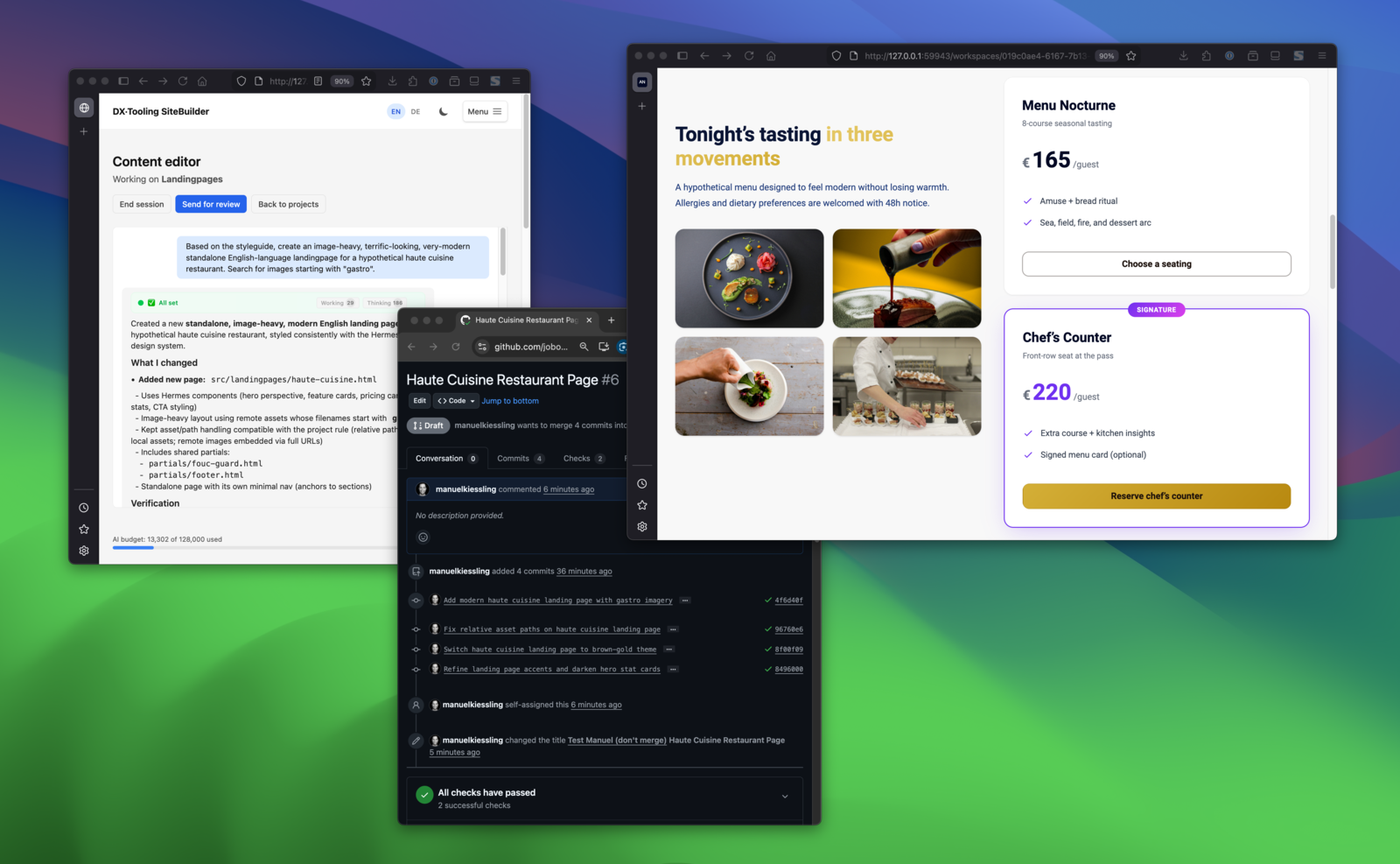
Describe in chat → see the result → changes land in a GitHub PR. The full loop.
The Problem
Here’s a situation that will sound familiar to many engineering teams: the marketing department needs to change a headline on the website. Or update a phone number. Or tweak some copy before a campaign goes live.
What happens next? A ticket is filed. An engineer context-switches away from actual engineering work. A pull request is created for a two-word change. Review cycles happen. Days pass.
Meanwhile, the marketing team waits. The engineer feels like an overpaid text editor. And everyone agrees there must be a better way — but CMS platforms either lack the control engineers need, or they’re so complex that the cure becomes worse than the disease.
I built SiteBuilder to solve this.
What SiteBuilder Does
SiteBuilder lets non-technical users edit web content through a chat interface. They describe what they want to change in plain language: “Update the hero headline to ‘Ship Faster’” or “Change the support email to help@company.com.”
Behind the scenes, an AI agent makes the actual code changes. But here’s what makes it different from “AI writes your website”: every change goes through Git. Engineers see exactly what changed in a pull request. They review, approve, and merge — or reject and provide feedback.
The result: marketing teams get autonomy to move fast, and engineering teams retain the workflows they trust.
How It Works
Here’s a quick demo showing SiteBuilder in action:
The architecture is straightforward:
- Connect a GitHub repository containing your website or landing pages.
- Users describe changes through a chat interface. The AI understands context and makes appropriate edits.
- Changes are committed to a branch with clear commit messages.
- A pull request is created automatically, ready for review.
- After approval, changes merge and deploy through your existing pipeline.
Every edit runs in an isolated Docker workspace. The AI can only touch files you’ve designated as editable. There’s no risk of accidental production changes — the Git workflow acts as the final gate.
Why This Approach
I’ve written before about how seasoned developers can work effectively with AI coding agents. The key insight: AI excels when given clear boundaries and verification mechanisms.
SiteBuilder applies this principle to content editing. The AI has a narrow, well-defined task: modify content within existing page structures. It doesn’t redesign layouts or refactor code. It changes text, updates images, and adjusts copy — the things marketing teams actually need to do.
This constraint is a feature, not a limitation. It means the AI produces predictable, reviewable changes instead of creative surprises that require debugging.
Features
SiteBuilder includes everything needed to run a self-service content editing workflow:
- Chat-based editing — Users describe changes in natural language. The AI agent interprets requests and makes appropriate edits to HTML, templates, and content files.
- GitHub integration — Connect repositories, automatically create branches and pull requests, and track all changes through standard Git workflows.
- Isolated workspaces — Each editing session runs in its own Docker container. Changes are sandboxed until explicitly submitted for review.
- Configurable environments — Projects can specify which Docker image to use (Node.js, Python, PHP, or custom images) depending on their build requirements.
- Real-time preview — See changes immediately in a live preview before committing.
- Project management — Create multiple projects, each connected to its own repository with its own configuration.
- Cost transparency — Track AI token usage per conversation so there are no billing surprises.
- Pull request workflow — All changes go through PRs. Engineers review diffs, approve or request changes, and merge when ready.
Architecture and Tech Stack
The application is built on Symfony 7.4 with PHP 8.4, using Doctrine ORM with MariaDB for persistence. The frontend uses TypeScript with Stimulus controllers, Tailwind CSS, and Symfony’s AssetMapper for asset management.
Workspace isolation is implemented through a two-layer approach:
Path validation — All file operations go through a security layer that validates paths stay within workspace boundaries. Traversal attempts like
../are blocked before any I/O happens.Containerized execution — Shell commands run in ephemeral Docker containers with only the workspace directory mounted. The container is destroyed after each command, and resource limits (memory, CPU) prevent runaway processes.
The codebase follows a vertical architecture where each feature lives in its own module under src/. Cross-feature communication happens exclusively through Facade interfaces and DTOs, which keeps boundaries clean and makes the system easier to reason about.
Key dependencies: - NeuronAI for LLM orchestration - Symfony Messenger for background job processing - Docker-in-Docker for spawning isolated agent containers - Mise for local development task orchestration
The entire system is open source and designed for self-hosting. You bring your own OpenAI or Anthropic API key, connect your repositories, and you’re ready to go.
Getting Started
SiteBuilder is available on GitHub:
github.com/dx-tooling/sitebuilder-webapp
The repository includes setup instructions for running your own instance. There’s also a project homepage with more details:
Closing Thoughts
The goal isn’t to replace engineers or eliminate code review. It’s to remove unnecessary friction from a common workflow: simple content changes that don’t require engineering expertise to conceptualize, but currently require engineering involvement to execute.
By putting AI in the middle — with Git as the safety net — we get the best of both worlds. Fast iteration for content teams, full visibility and control for engineering.
If you’re tired of being the bottleneck for typo fixes and headline changes, give SiteBuilder a try.