SiteBuilder Architecture Insights: Agent Tools and Execution Context
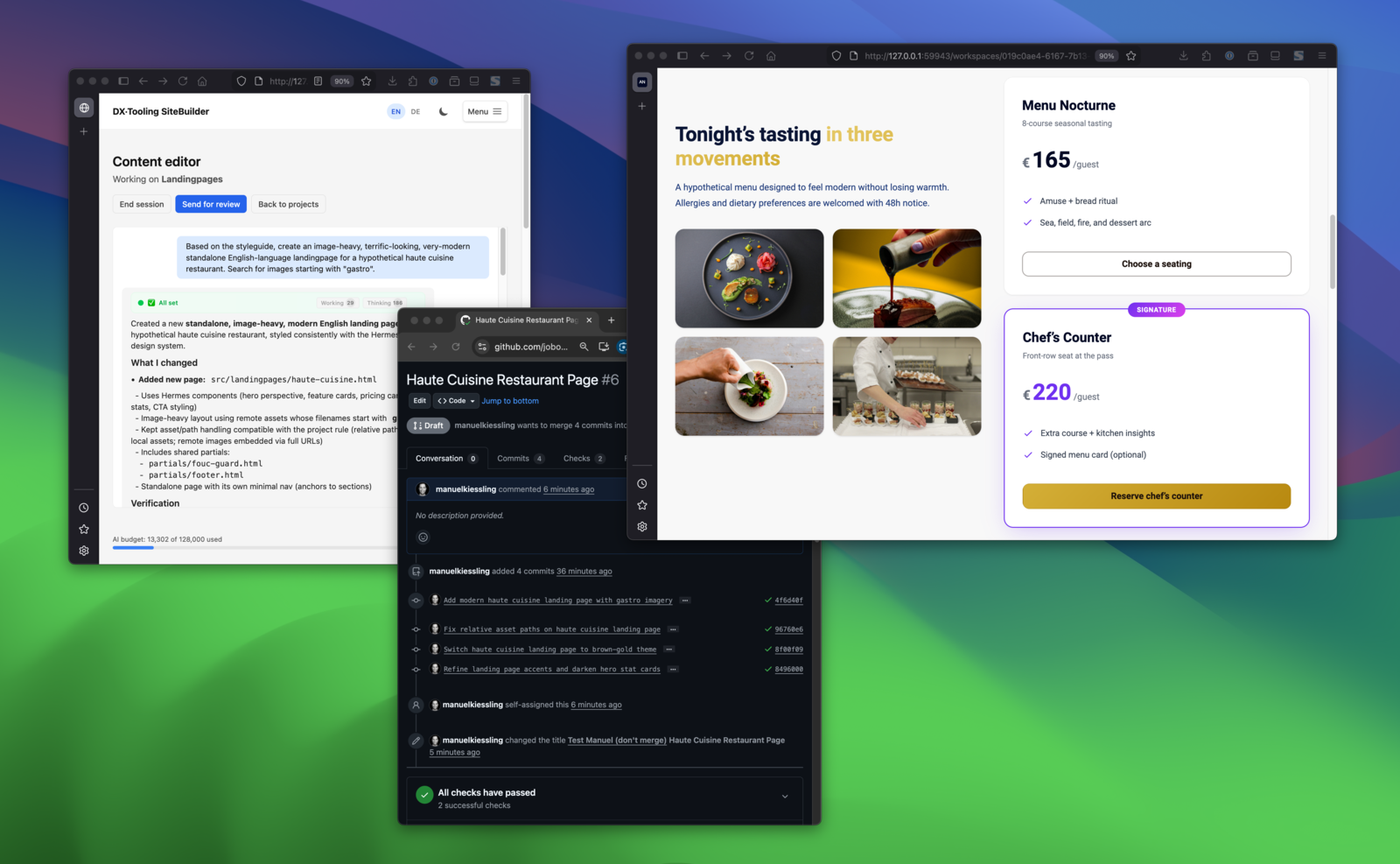
Describe in chat → see the result → changes land in a GitHub PR. The full loop.
SiteBuilder is an open-source tool that lets non-technical teams edit web content through chat while engineers keep Git workflows and full control. Marketing describes changes in plain language; an AI agent makes the edits; every change goes through a pull request for review. This post is a technical follow-up — if you’re new to SiteBuilder, the introductory post covers the problem it solves and how it works.
Introduction
I’ve been working on several improvements to SiteBuilder this week, and while implementing them, I encountered some interesting architectural decisions worth sharing. The features themselves are straightforward — better commit messages, preview URL sharing, conversation history viewing — but the implementation patterns illustrate how the system’s boundaries work together.
This post covers what was built, how the pieces fit together, and why certain design choices were made.
The Features at a Glance
Here’s what shipped:
suggest_commit_messagetool — The agent can now propose descriptive commit messages instead of using generic instruction-based messagesget_preview_urltool — The agent can translate sandbox paths to browser-accessible URLs for sharing previews- Read-only conversation view — Finished conversations are viewable instead of redirecting away
- Reviewer dashboard links — Direct access to PRs and conversations from the reviews page
- Cached PR URLs — Eliminated N+1 GitHub API calls on the projects page
Passing Data from Tools to Handlers
The most interesting implementation challenge was suggest_commit_message. The agent calls this tool during execution, but the commit happens later in RunEditSessionHandler after the agent finishes. How do we pass the suggested message from the tool to the handler?
The solution: AgentExecutionContext
The execution context is a request-scoped service shared between the handler and the tooling layer. It’s injected as an interface (AgentExecutionContextInterface) into both places:
<?php
// src/WorkspaceTooling/Facade/WorkspaceToolingFacade.php
public function suggestCommitMessage(string $message): string
{
    $this->executionContext->setSuggestedCommitMessage($message);

    return 'Commit message recorded: ' . $message;
}
<?php
// src/ChatBasedContentEditor/Infrastructure/Handler/RunEditSessionHandler.php
$suggestedMessage = $this->executionContext->getSuggestedCommitMessage();
$commitMessage    = $suggestedMessage
    ?? 'Edit session: ' . $this->truncateMessage($session->getInstruction(), 50);
This approach has several advantages:
- No database migration — The message is transient, only needed during the request lifecycle
- Clean boundaries —
WorkspaceToolingowns the context and the tool interface;ChatBasedContentEditorreads from it via the interface - Testable — You can mock the context interface for unit tests
The alternative — storing the message in the database — would have added complexity for a value that’s only needed for seconds.
Path Translation for Preview URLs
The get_preview_url tool solves a sandboxing challenge. The agent runs in a Docker container where it sees paths like /workspace/dist/pricing.html. But users need URLs they can click.
The implementation normalizes and validates paths before building URLs:
<?php
// src/WorkspaceTooling/Facade/WorkspaceToolingFacade.php
public function getPreviewUrl(string $sandboxPath): string
{
    $workspaceId = $this->executionContext->getWorkspaceId();

    if ($workspaceId === null) {
        return 'Error: Execution context not set. Cannot generate preview URL.';
    }

    $path = trim($sandboxPath);

    // Strip the /workspace prefix (the Docker mount point)
    $workspacePrefix = '/workspace/';
    if (str_starts_with($path, $workspacePrefix)) {
        $relativePath = substr($path, strlen($workspacePrefix));
    } elseif (str_starts_with($path, '/workspace')) {
        $relativePath = substr($path, strlen('/workspace'));
        $relativePath = ltrim($relativePath, '/');
    } else {
        $relativePath = ltrim($path, '/');
    }

    // Security check: prevent path traversal
    if (str_contains($relativePath, '..')) {
        return 'Error: Invalid path - path traversal not allowed.';
    }

    // Normalize double slashes
    $relativePath = preg_replace('#/+#', '/', $relativePath) ?? $relativePath;
    $relativePath = ltrim($relativePath, '/');

    return '/workspaces/' . $workspaceId . '/' . $relativePath;
}
The path traversal check is important — without it, a malicious instruction could potentially access files outside the workspace through the preview endpoint. Note that errors are returned as strings rather than exceptions since this is a tool the agent calls; throwing exceptions would break the agent’s execution flow.
Conditional UI with a Single Template
For the read-only conversation view, I considered creating a separate template. Instead, the existing chat_based_content_editor.twig uses a readOnly flag with conditional blocks:
{# src/ChatBasedContentEditor/Presentation/Resources/templates/chat_based_content_editor.twig #}
{% if not readOnly %}
<form data-controller="chat-input">
    {# ... chat input form ... #}
</form>
{% endif %}

{% if not readOnly %}
<div data-controller="heartbeat">
    {# ... presence tracking ... #}
</div>
{% endif %}
The Stimulus controller receives readOnly as a value and adjusts its behavior:
// assets/controllers/chat_based_content_editor_controller.ts
static values = {
    readOnly: Boolean,
    // ... other values
}

connect() {
    if (!this.readOnlyValue) {
        this.startContextUsagePolling();
        this.resumeActiveSession();
    }
    // Dialog rendering always runs
    this.renderCompletedTurnsTechnicalContainers();
}
This keeps all dialog rendering logic in one place instead of duplicating it across templates.
Caching to Eliminate N+1 API Calls
The projects page was slow because each workspace row triggered a GitHub API call to fetch the PR URL. With 10 projects, that’s 10 sequential requests, each taking 300-1000ms.
The fix caches the PR URL in the Workspace entity:
<?php
// src/WorkspaceMgmt/Domain/Entity/Workspace.php
#[ORM\Column(type: 'string', length: 500, nullable: true)]
private ?string $pullRequestUrl = null;

public function getPullRequestUrl(): ?string
{
    return $this->pullRequestUrl;
}

public function setPullRequestUrl(?string $url): void
{
    $this->pullRequestUrl = $url;
}
The URL is set when ensurePullRequest() creates or finds the PR:
<?php
// src/WorkspaceMgmt/Domain/Service/WorkspaceGitService.php
public function ensurePullRequest(Workspace $workspace): string
{
    $existingPr = $this->findOpenPullRequest($workspace);

    if ($existingPr) {
        $url = $existingPr['html_url'];
    } else {
        $pr = $this->createPullRequest($workspace);
        $url = $pr['html_url'];
    }

    $workspace->setPullRequestUrl($url);
    $this->entityManager->flush();

    return $url;
}
The cache is cleared in two places to maintain consistency:
WorkspaceSetupService::performSetup()— when a new branch is createdWorkspaceMgmtFacade::resetWorkspaceForSetup()— on manual reset
After a PR is merged, the URL remains valid (GitHub PRs don’t disappear after merging), so there’s no need to clear it on merge.
Architecture Boundaries in Practice
These features touched multiple verticals:
- WorkspaceTooling — owns
AgentExecutionContext, tool definitions, and facade - ChatBasedContentEditor — owns the conversation UI and handler
- WorkspaceMgmt — owns workspace entities and setup logic
Communication happens through interfaces and DTOs:
ChatBasedContentEditor
    ↓ (uses interface)
AgentExecutionContextInterface
    ↑ (implements)
WorkspaceTooling/AgentExecutionContext
This means ChatBasedContentEditor has no compile-time dependency on WorkspaceTooling internals. It only depends on the interface it needs.
Testing the Pieces
Each component has focused tests:
AgentExecutionContext tests verify state management:
<?php
// tests/Unit/WorkspaceTooling/AgentExecutionContextTest.php
public function testSuggestedCommitMessageIsNullByDefault(): void
{
    $context = new AgentExecutionContext();

    self::assertNull($context->getSuggestedCommitMessage());
}

public function testSetSuggestedCommitMessageStoresMessage(): void
{
    $context = new AgentExecutionContext();

    $context->setSuggestedCommitMessage('Add hero section to homepage');

    self::assertSame('Add hero section to homepage', $context->getSuggestedCommitMessage());
}
WorkspaceToolingFacade tests verify tool behavior:
<?php
// tests/Unit/WorkspaceTooling/WorkspaceToolingFacadeTest.php
public function testGetPreviewUrlRejectsPathTraversal(): void
{
    $result = $facade->getPreviewUrl('/workspace/../../../etc/passwd');

    self::assertSame('Error: Invalid path - path traversal not allowed.', $result);
}

public function testGetPreviewUrlReturnsCorrectUrlForDistFile(): void
{
    $result = $facade->getPreviewUrl('/workspace/dist/handwerk.html');

    self::assertSame('/workspaces/test-workspace-id/dist/handwerk.html', $result);
}
Wrapping Up
These features are individually small, but they demonstrate how a well-structured architecture makes additions predictable. The agent execution context pattern, in particular, provides a clean way to pass transient data through the request lifecycle without reaching for the database.
If you’re building systems with AI agents, consider what data needs to persist versus what’s only needed during execution. The distinction often suggests different implementation approaches.
SiteBuilder is open source at github.com/dx-tooling/sitebuilder-webapp. The commits discussed here are all in the main branch if you want to see the full implementation.