SiteBuilder Remote Assets: Cross-Vertical Architecture and S3 Integration
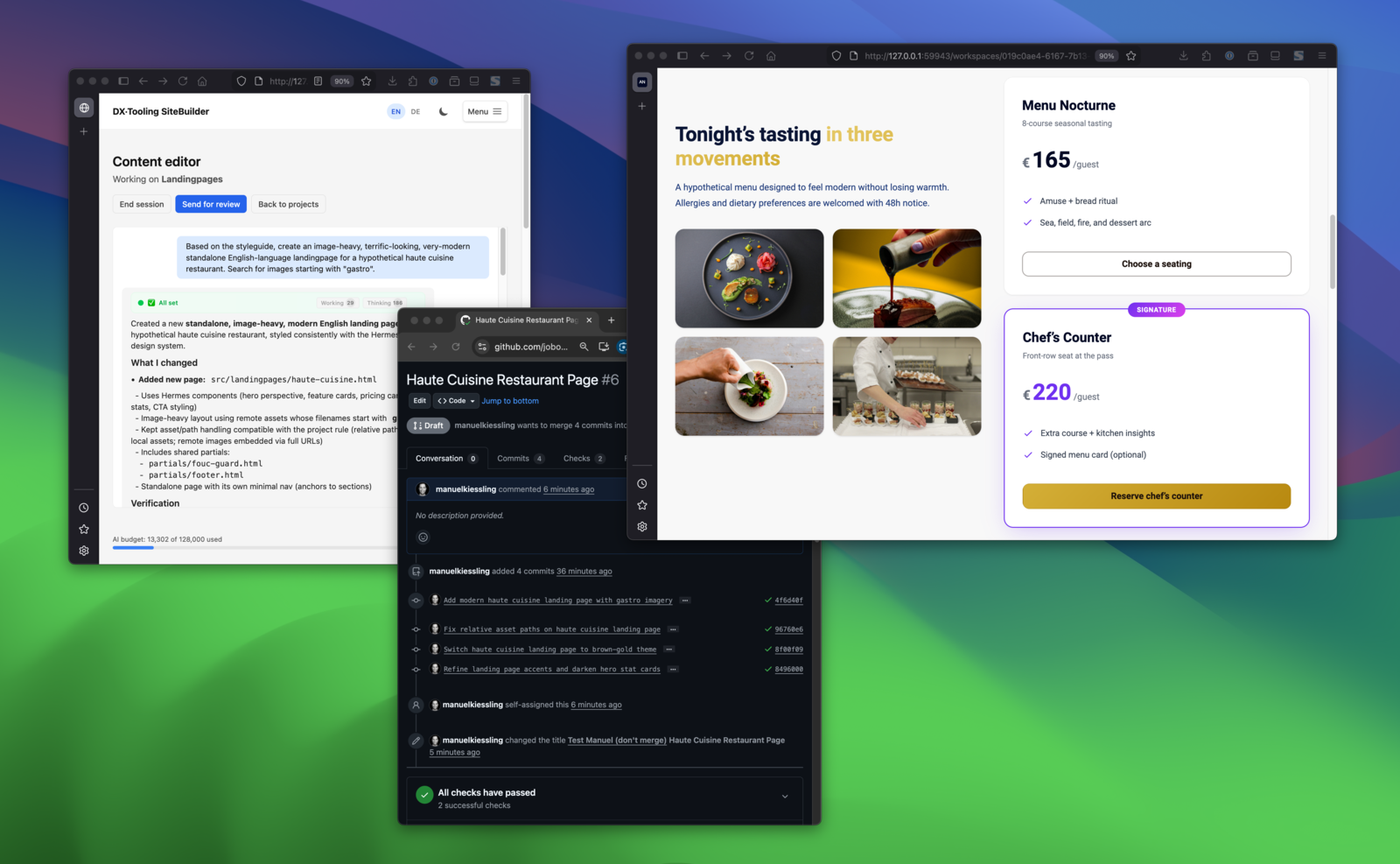
Describe in chat → see the result → changes land in a GitHub PR. The full loop.
SiteBuilder is an open-source tool that lets non-technical teams edit web content through chat while engineers keep Git workflows and full control. Marketing describes changes in plain language; an AI agent makes the edits; every change goes through a pull request for review. This post is a technical deep-dive — if you’re new to SiteBuilder, the introductory post covers the problem it solves and how it works.
Introduction
Following my previous posts on introducing SiteBuilder and agent architecture insights, I’ve been working on a substantial new feature: remote content assets. This feature allows projects to reference external asset manifests and upload images directly to S3.
What makes this interesting architecturally is how the feature spans multiple verticals while respecting the system’s boundaries. This post covers the design decisions, the facade pattern in practice, and the S3 integration with IAM role assumption.
The Feature at a Glance
Remote content assets enables:
- Asset manifests — Projects can configure URLs to external JSON manifests listing available assets
- Asset browser UI — A collapsible panel showing all available assets with image previews
- S3 upload — Drag-and-drop image upload directly to S3 buckets
- Agent tools — Three new tools for the agent to discover and reference assets
The implementation touches four verticals: - ProjectMgmt — stores manifest URLs and S3 configuration per project - RemoteContentAssets — owns the asset fetching, caching, and S3 upload logic - WorkspaceTooling — exposes asset capabilities to the agent - ChatBasedContentEditor — renders the asset browser UI
Cross-Vertical Communication
The key architectural challenge: how does ChatBasedContentEditor display assets without depending directly on RemoteContentAssets?
The answer is the facade pattern. RemoteContentAssets exposes a RemoteContentAssetsFacadeInterface:
<?php
// src/RemoteContentAssets/Facade/RemoteContentAssetsFacadeInterface.php
namespace App\RemoteContentAssets\Facade;

interface RemoteContentAssetsFacadeInterface
{
    /**
     * @return list<RemoteAssetDto>
     */
    public function listAssets(string $projectId): array;

    public function getAssetInfo(string $projectId, string $url): ?RemoteAssetDto;

    /**
     * @return list<RemoteAssetDto>
     */
    public function searchAssets(string $projectId, string $pattern): array;

    public function uploadToS3(
        string $projectId,
        string $filename,
        string $content,
        string $contentType
    ): string;
}
The implementation handles: - Fetching and caching manifest data - Parsing asset metadata - S3 client instantiation with role assumption - Upload with proper content types
Other verticals inject RemoteContentAssetsFacadeInterface — they depend on the interface, not the implementation. This keeps compile-time dependencies clean and makes testing straightforward.
Agent Tool Implementation
The agent gains three new tools through WorkspaceTooling. Here’s how the facade integration works:
<?php
// src/WorkspaceTooling/Facade/WorkspaceToolingFacade.php
public function listRemoteContentAssetUrls(): string
{
    $projectId = $this->executionContext->getProjectId();

    if ($projectId === null) {
        return 'Error: Execution context not set. Cannot list remote assets.';
    }

    $assets = $this->remoteContentAssetsFacade->listAssets($projectId);

    if (empty($assets)) {
        return 'No remote content assets configured for this project.';
    }

    $urls = array_map(
        fn(RemoteAssetDto $asset) => $asset->url,
        $assets
    );

    return implode("\n", $urls);
}
The pattern is consistent across all three tools:
- Get the project ID from the execution context
- Call the facade method
- Format the result as a string (tools return strings to the LLM)
Error handling returns user-friendly strings rather than throwing exceptions — the agent needs to understand what went wrong and potentially try a different approach.
The search tool supports regex patterns:
<?php
public function searchRemoteContentAssetUrls(string $pattern): string
{
    $projectId = $this->executionContext->getProjectId();

    if ($projectId === null) {
        return 'Error: Execution context not set. Cannot search remote assets.';
    }

    try {
        $assets = $this->remoteContentAssetsFacade->searchAssets($projectId, $pattern);
    } catch (\InvalidArgumentException $e) {
        return 'Error: Invalid regex pattern - ' . $e->getMessage();
    }

    if (empty($assets)) {
        return 'No assets match the pattern: ' . $pattern;
    }

    $urls = array_map(
        fn(RemoteAssetDto $asset) => $asset->url,
        $assets
    );

    return implode("\n", $urls);
}
Regex validation happens in the facade, but we catch the exception here to provide a helpful error message to the agent.
S3 Integration with IAM Role Assumption
The S3 upload feature uses IAM role assumption rather than static credentials. This is more secure — the SiteBuilder instance assumes a role with limited permissions rather than holding long-lived credentials.
The flow:
- Project configuration stores: bucket name, region, IAM role ARN, optional path prefix
- On upload, we create an STS client and call
AssumeRole - The temporary credentials are used to instantiate an S3 client
- Upload happens with the temporary credentials
<?php
// src/RemoteContentAssets/Service/S3UploadService.php
private function getS3ClientForProject(Project $project): S3Client
{
    $config = $project->getS3UploadConfig();

    $stsClient = new StsClient([
        'region'  => $config->getRegion(),
        'version' => 'latest',
    ]);

    $result = $stsClient->assumeRole([
        'RoleArn'         => $config->getRoleArn(),
        'RoleSessionName' => 'sitebuilder-upload-' . $project->getId(),
        'DurationSeconds' => 900, // 15 minutes
    ]);

    return new S3Client([
        'region'      => $config->getRegion(),
        'version'     => 'latest',
        'credentials' => [
            'key'    => $result['Credentials']['AccessKeyId'],
            'secret' => $result['Credentials']['SecretAccessKey'],
            'token'  => $result['Credentials']['SessionToken'],
        ],
    ]);
}
The 15-minute credential duration is intentional — uploads should complete quickly, and short-lived credentials limit the blast radius if something goes wrong.
The IAM role on the AWS side needs:
- Trust policy allowing the SiteBuilder instance to assume it
- Permission policy granting s3:PutObject on the target bucket/prefix
This separation means the SiteBuilder instance itself has no direct S3 permissions — it can only act through the assumed role.
UI Component Design
The asset browser uses a Stimulus controller to manage state and interactions:
// assets/controllers/remote_assets_browser_controller.ts
import { Controller } from '@hotwired/stimulus';

export default class extends Controller {
    static targets = ['list', 'searchInput', 'preview'];
    static values = {
        projectId: String,
        assetsUrl: String,
    };

    private assets: Asset[] = [];

    async connect() {
        await this.loadAssets();
        this.render();
    }

    async loadAssets() {
        const response = await fetch(this.assetsUrlValue);
        this.assets = await response.json();
    }

    filter() {
        const query = this.searchInputTarget.value.toLowerCase();
        const filtered = this.assets.filter(asset =>
            asset.filename.toLowerCase().includes(query) ||
            asset.url.toLowerCase().includes(query)
        );
        this.render(filtered);
    }

    insert(event: Event) {
        const url = (event.currentTarget as HTMLElement).dataset.url;
        // Dispatch custom event for the chat input to catch
        this.dispatch('insert', { detail: { url } });
    }
}
The controller: - Fetches assets on connect - Filters client-side for immediate feedback - Dispatches events for insertion (loosely coupled to the chat input)
On wider screens, the layout switches to side-by-side using CSS grid:
@media (min-width: 1024px) {
    .assets-panel {
        display: grid;
        grid-template-columns: 1fr 1fr;
        gap: 1rem;
    }
}
This responsive approach keeps the interface usable on smaller screens while taking advantage of available space.
Testing Strategy
Each layer has focused tests:
Facade tests verify business logic:
<?php
// tests/Unit/RemoteContentAssets/RemoteContentAssetsFacadeTest.php
public function testListAssetsReturnsCachedManifest(): void
{
    $this->manifestFetcher
        ->method('fetch')
        ->willReturn($this->sampleManifest);

    $assets = $this->facade->listAssets('project-123');

    self::assertCount(3, $assets);
    self::assertSame('hero.jpg', $assets[0]->filename);
}

public function testSearchAssetsFiltersWithRegex(): void
{
    $this->manifestFetcher
        ->method('fetch')
        ->willReturn($this->sampleManifest);

    $assets = $this->facade->searchAssets('project-123', '/hero/');

    self::assertCount(1, $assets);
}

public function testSearchAssetsThrowsOnInvalidRegex(): void
{
    $this->expectException(\InvalidArgumentException::class);

    $this->facade->searchAssets('project-123', '/invalid[/');
}
S3 upload tests use mocked AWS clients:
<?php
public function testUploadToS3ReturnsPublicUrl(): void
{
    $this->stsClient
        ->method('assumeRole')
        ->willReturn($this->mockCredentials);

    $this->s3Client
        ->method('putObject')
        ->willReturn(new Result([]));

    $url = $this->service->upload(
        $this->project,
        'test.jpg',
        'image-content',
        'image/jpeg'
    );

    self::assertStringContainsString('test.jpg', $url);
    self::assertStringContainsString($this->project->getS3UploadConfig()->getBucket(), $url);
}
Controller tests verify HTTP layer behavior with actual requests.
Architecture Boundaries in Practice
The remote assets feature demonstrates the vertical architecture working as intended:
ChatBasedContentEditor          WorkspaceTooling
        ↓                              ↓
        ↓ (uses interface)             ↓ (uses interface)
        ↓                              ↓
RemoteContentAssetsFacadeInterface ←───┘
        ↑
        ↑ (implements)
        ↑
RemoteContentAssets/Facade/RemoteContentAssetsFacade
        ↓
        ↓ (owns)
        ↓
RemoteContentAssets/Service/S3UploadService
RemoteContentAssets/Service/ManifestFetcherService
No vertical has a compile-time dependency on another vertical’s internals. Communication happens through interfaces and DTOs. This means:
- Changes to S3 implementation don’t affect the UI
- New asset sources can be added without modifying consumers
- Each vertical can be tested in isolation
Wrapping Up
The remote content assets feature is a good example of how a well-structured architecture handles cross-cutting concerns. The facade pattern provides clean boundaries, IAM role assumption provides secure S3 access, and the Stimulus controller keeps the UI responsive.
If you’re building features that span multiple domains in your own systems, consider: - Which vertical “owns” the core logic - What interface consumers actually need - Whether temporary credentials can replace static secrets
SiteBuilder is open source at github.com/dx-tooling/sitebuilder-webapp. The remote assets implementation is in the RemoteContentAssets directory if you want to explore the full code.